
Deal progression & chain health
See exactly where every deal stands, keep your chain moving, and stop losing sales to problems you couldn't see coming.
What this does
Deal progression tracks every milestone from Pre-Market to Closed, with built-in compliance gates, one-click chasing, and a full audit trail. Chain health shows you every property above and below yours in a transaction — including deals run by other agents — so you always know where the risk is.
The 8-stage deal pipeline
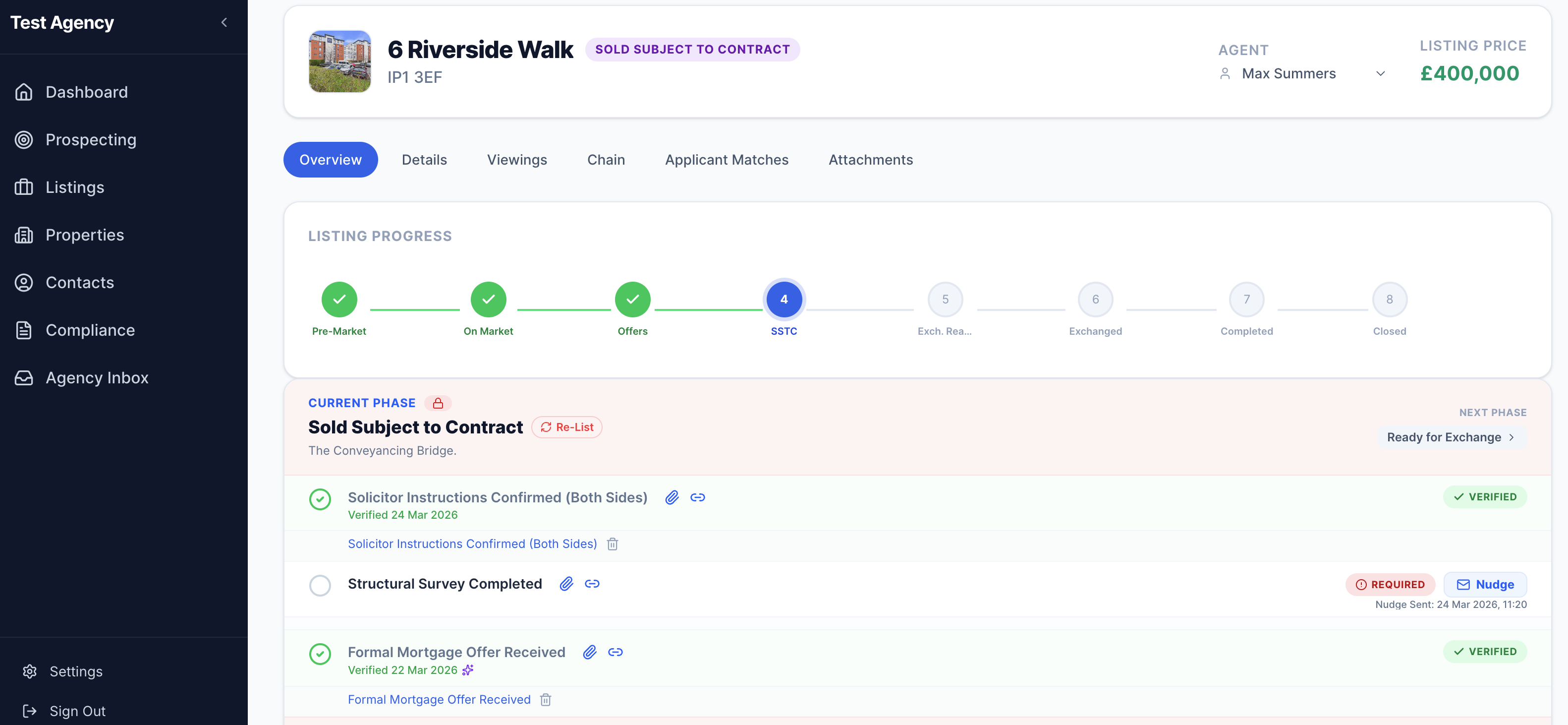
Every listing moves through eight defined stages. Completed stages show a green tick, your current stage is highlighted in blue, and upcoming stages are always visible so you can see what's coming before it arrives.
Each stage is compliance-gated — meaning the system tells you exactly what needs to happen before you can advance. Nothing gets skipped, and nothing gets forgotten.
Managing offers
All offers sit inside the deal, not in a separate place. You can see every offer at a glance — accepted, rejected, and under review — with a full compliance checklist triggered automatically the moment an offer is accepted.
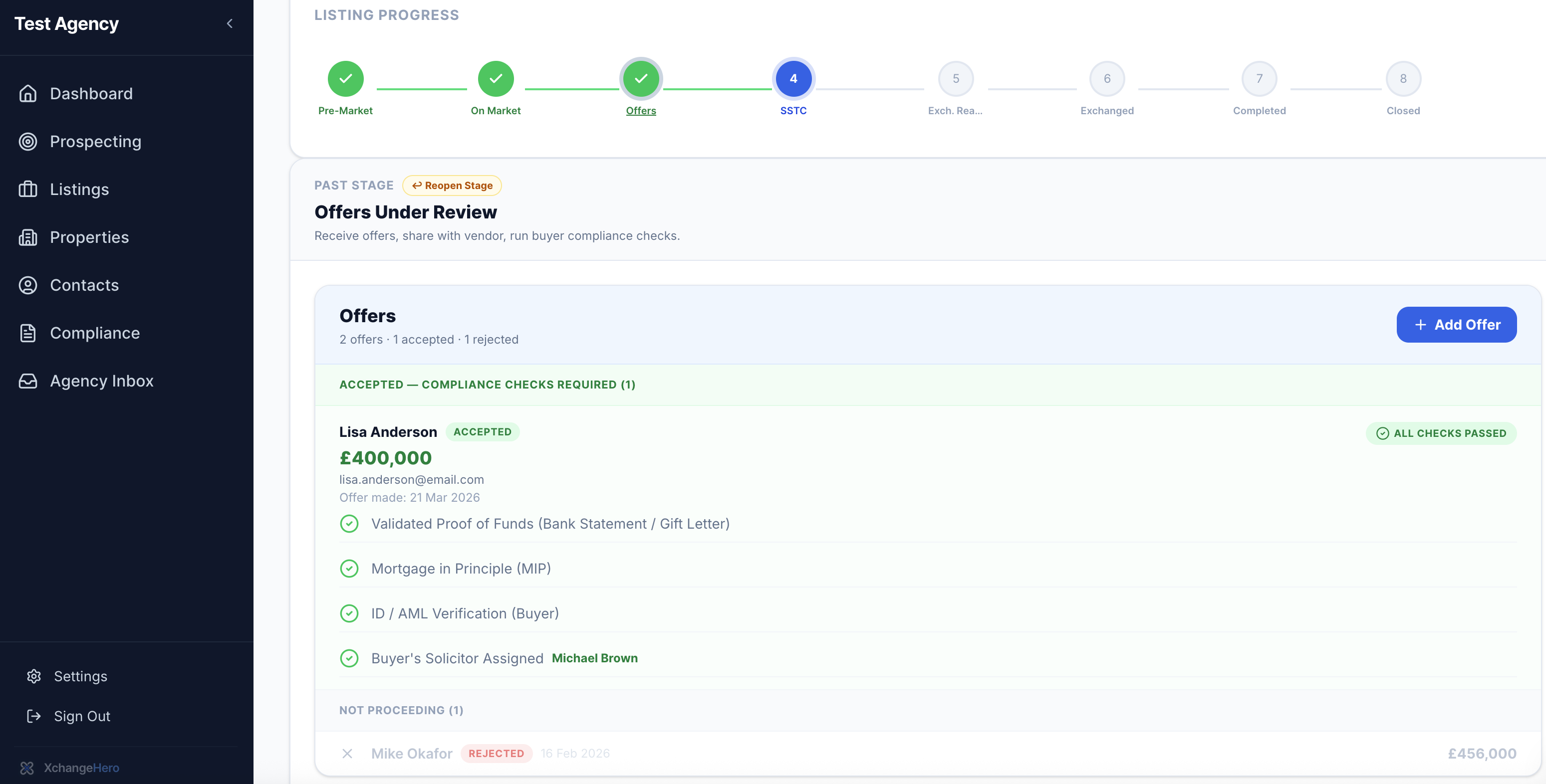
When an offer is accepted, XchangeHero immediately checks off:
- ✓Validated proof of funds (bank statement / gift letter)Verified
- ✓Mortgage in principle (MIP)Verified
- ✓ID / AML verification (buyer)Verified
- ✓Buyer's solicitor assignedVerified
When all checks pass, you'll see an All Checks Passed badge. Rejected offers are archived — not deleted — so you always have a full record of everything received.
Tip
You can reopen a past stage at any time using the Reopen Stage button — useful if a deal falls back or information needs to be corrected.
Memorandum of Sale
When you accept an offer, XchangeHero automatically opens the Memorandum of Sale — the formal written record that a deal has been agreed. Fill in the optional details, choose which parties receive it, and hit send. The deal moves to SSTC the moment the emails go out.
You can optionally add:
- Completion date — defaults to TBC; update it when a date is agreed
- Mortgage broker — search your existing contacts or add a new one on the spot
- Special conditions — any agreed terms specific to this sale
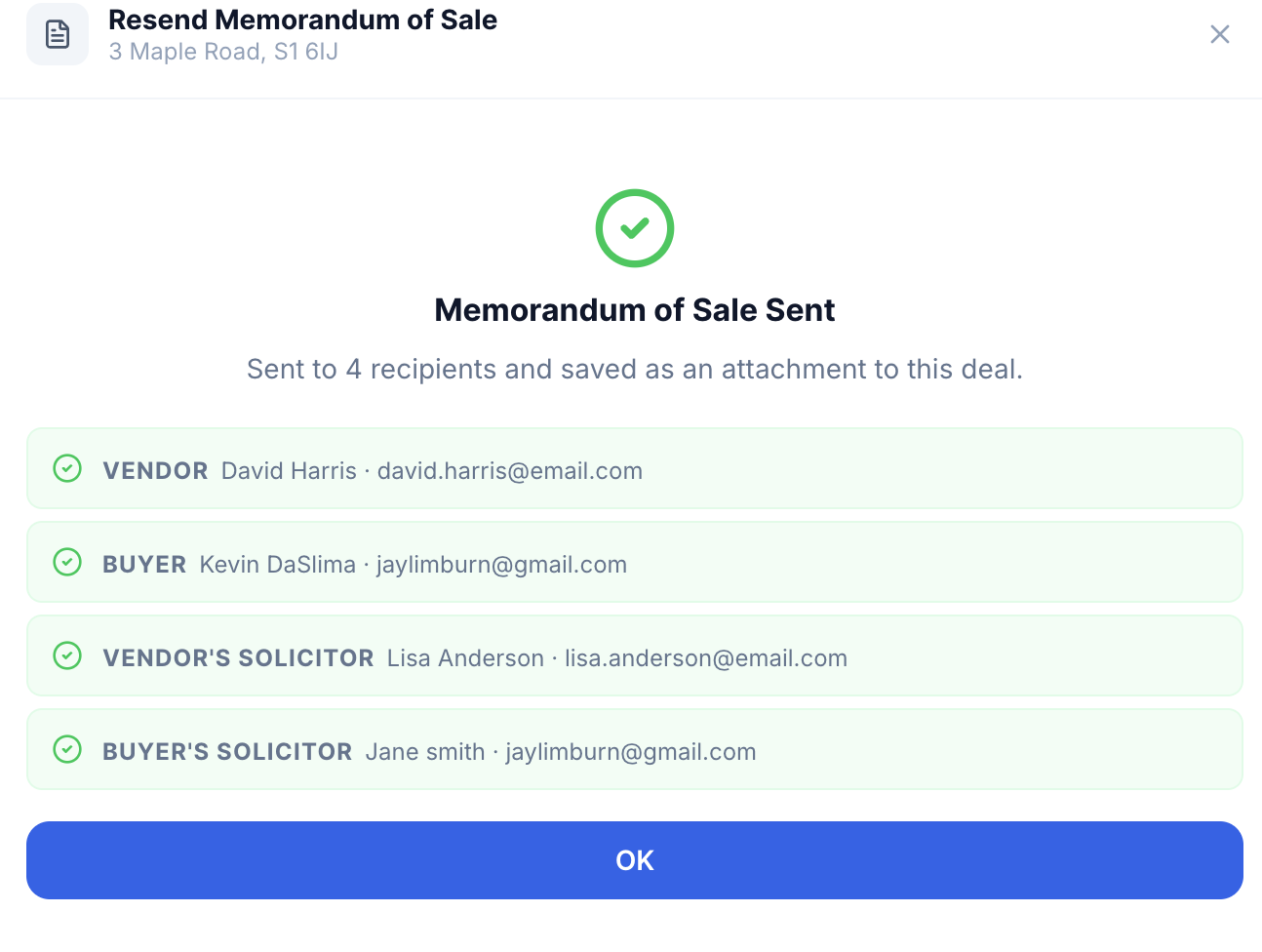
The letter is emailed simultaneously to all selected parties — vendor, buyer, vendor's solicitor, and buyer's solicitor — using the contact details already held on the deal. Each recipient receives a properly formatted letter carrying your agency letterhead, the agreed price, tenure details, and a Subject to Contract — Not legally binding disclaimer.
Missed someone? Use Resend MoS
A Resend MoSbutton sits next to the Verified badge in the SSTC checklist. Parties who have already been notified are deselected by default so you won't double-send; anyone not yet notified is ticked and ready to go. The “Not yet notified” warning clears automatically as soon as their email is sent.
Every MoS is stored permanently against the deal. Click the link in the Attachments tab to view the formatted letter exactly as it was sent.
Staying ahead with upcoming stages
You don't have to wait to see what's coming. Click any upcoming stage in the pipeline to preview its checklist before you get there — so you can have confident, proactive conversations with your vendor instead of "I'll chase them and get back to you."
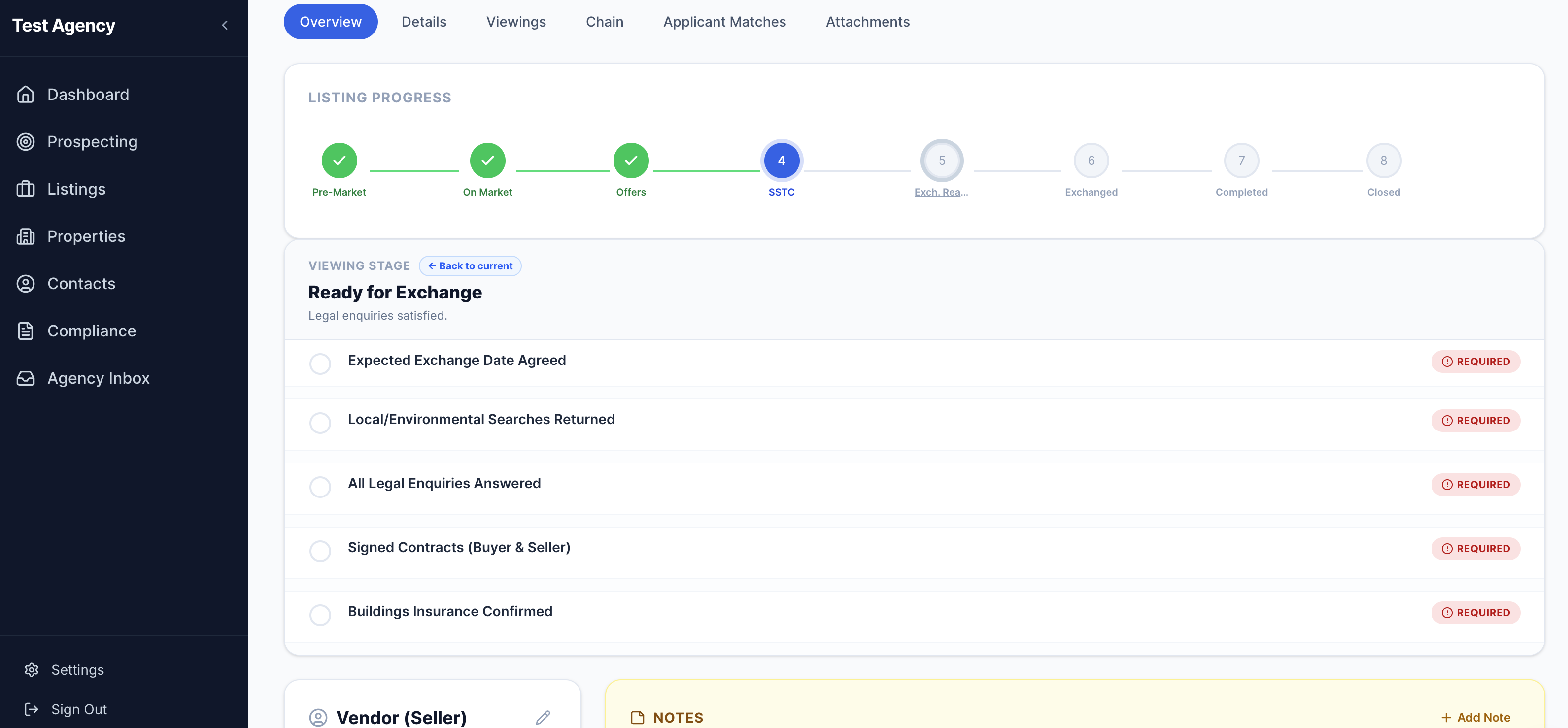
The Ready for Exchange checklist includes:
- !Expected exchange date agreedRequired
- !Local / environmental searches returnedRequired
- !All legal enquiries answeredRequired
- !Signed contracts (buyer & seller)Required
- !Buildings insurance confirmedRequired
Nudge — chase anyone in one click
When a milestone is outstanding and things have gone quiet, hit Nudge next to the item. XchangeHero instantly drafts a professional, personalised chase email — ready to send in seconds.
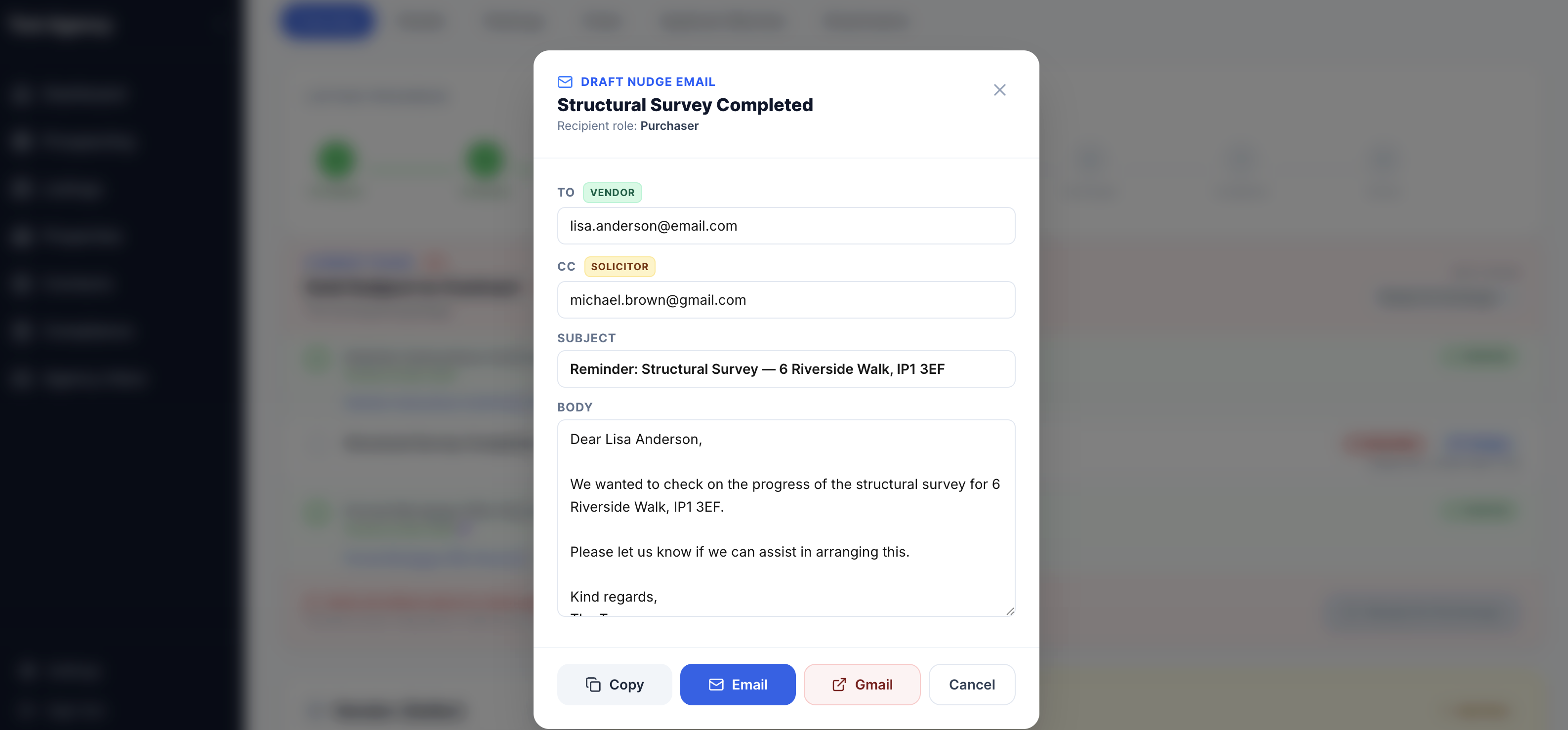
Every Nudge email is automatically:
- Addressed to the correct party (vendor, buyer, or solicitor)
- CC'd to the relevant solicitor
- Pre-filled with the property address in the subject line
- Written in a professional, polite tone — edit if you want, send as-is if you don't
Every Nudge is logged against the deal with a timestamp — so there's never any question about whether a chase was sent.
Advancing to the next stage
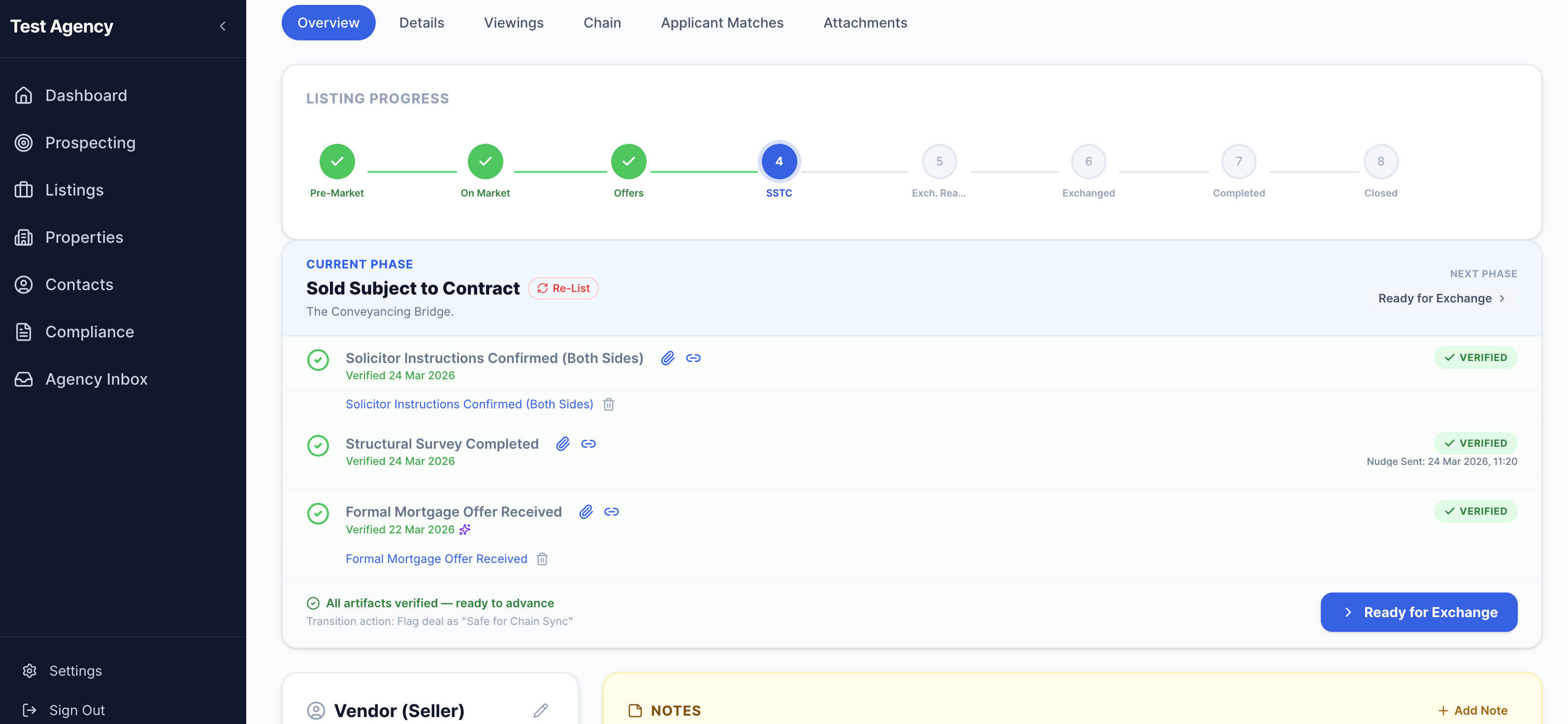
When all milestones in a stage are verified, XchangeHero shows a green confirmation banner and a prominent button to advance the deal. One click moves everything forward — cleanly, confidently, and on the record.
How AI verification works
When relevant emails arrive — a mortgage offer confirmation, solicitor instructions — the AI Inbox Agent reads them and automatically marks the corresponding milestone as verified. You'll see a sparkle icon and a verified timestamp. No manual ticking required.
Attachments — all your paperwork in one place
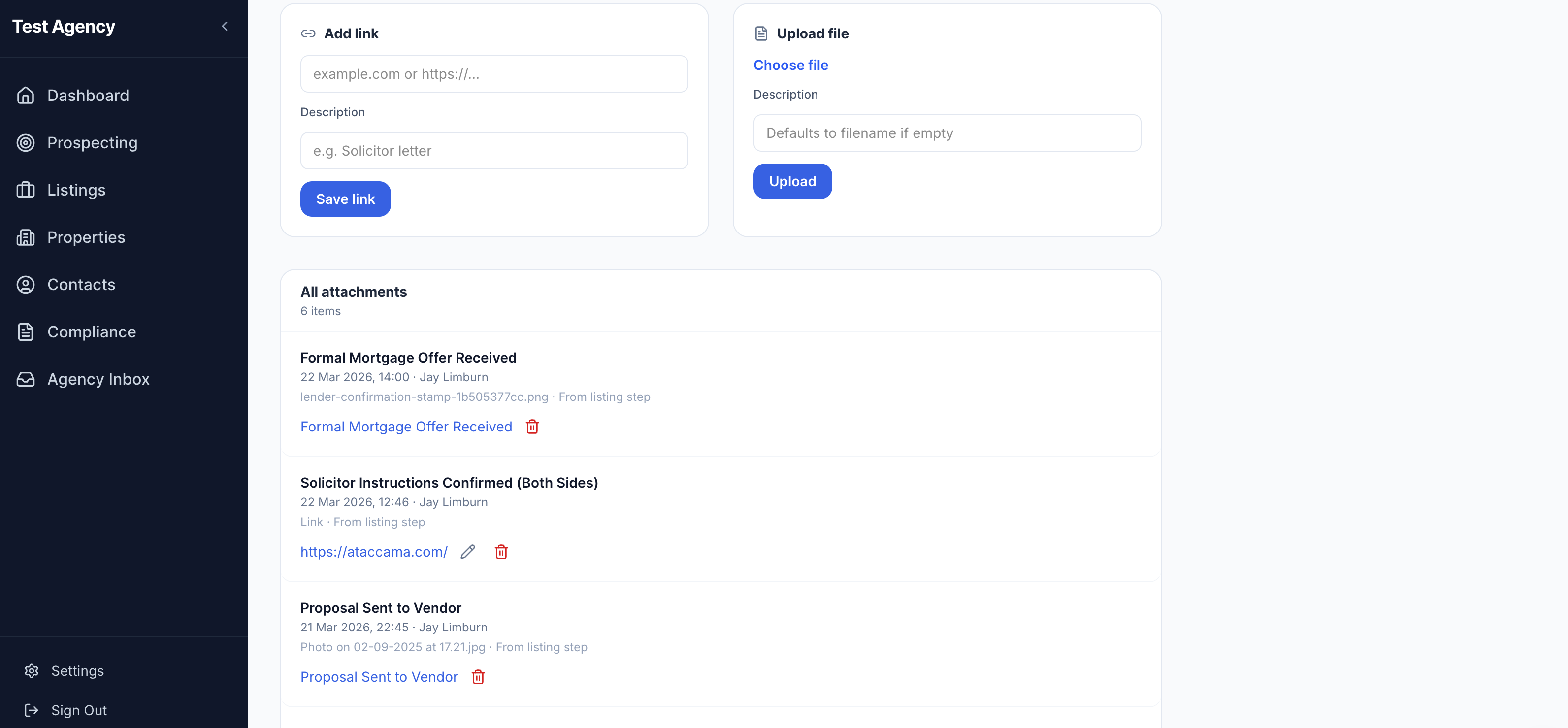
Every document and link related to a deal lives in the Attachments tab. Upload files directly or save links to external portals. Each attachment is tagged to the listing step it came from, so you always know why a document exists.
Compliance tip
If your agency ever faces a compliance audit or a vendor dispute, everything is right here — timestamped, attributed, and linked to the stage it belongs to. Make it a habit to attach evidence as soon as it arrives.
The audit & history log
Every action taken on a deal is recorded automatically — who verified what, when nudges were sent, what notes were added, and even when something was unverified and corrected. The log is a true history of the transaction.
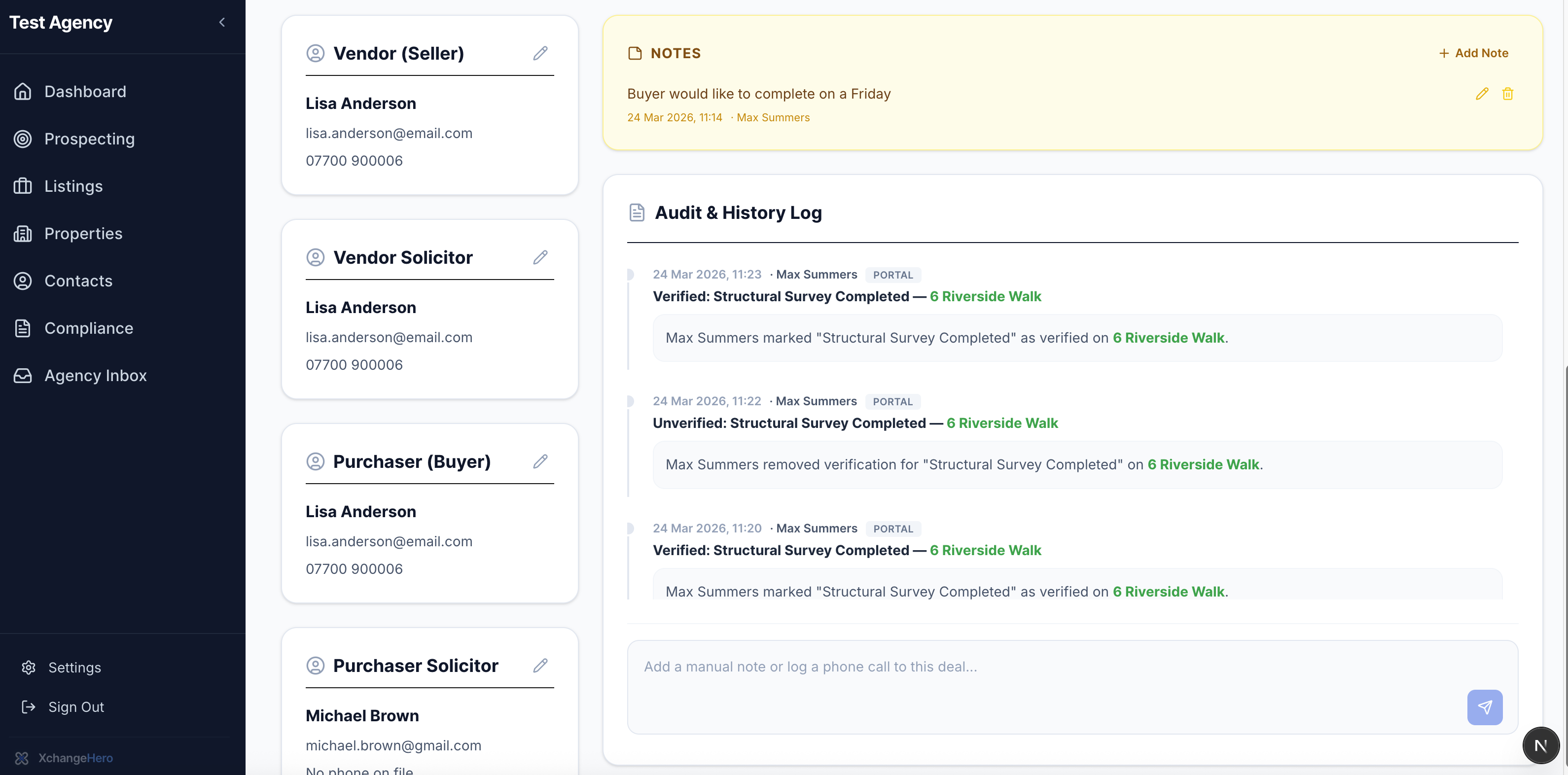
You can also add free-text notes at any time — things like "Buyer would like to complete on a Friday" — or log a phone call so verbal conversations stay on the record too.
Chain health management
This is where XchangeHero does something no other estate agent system does. The Chain tab on any listing shows every property above and below yours in the transaction — including deals run by other agents — so you can see the full picture, not just your bit of it.
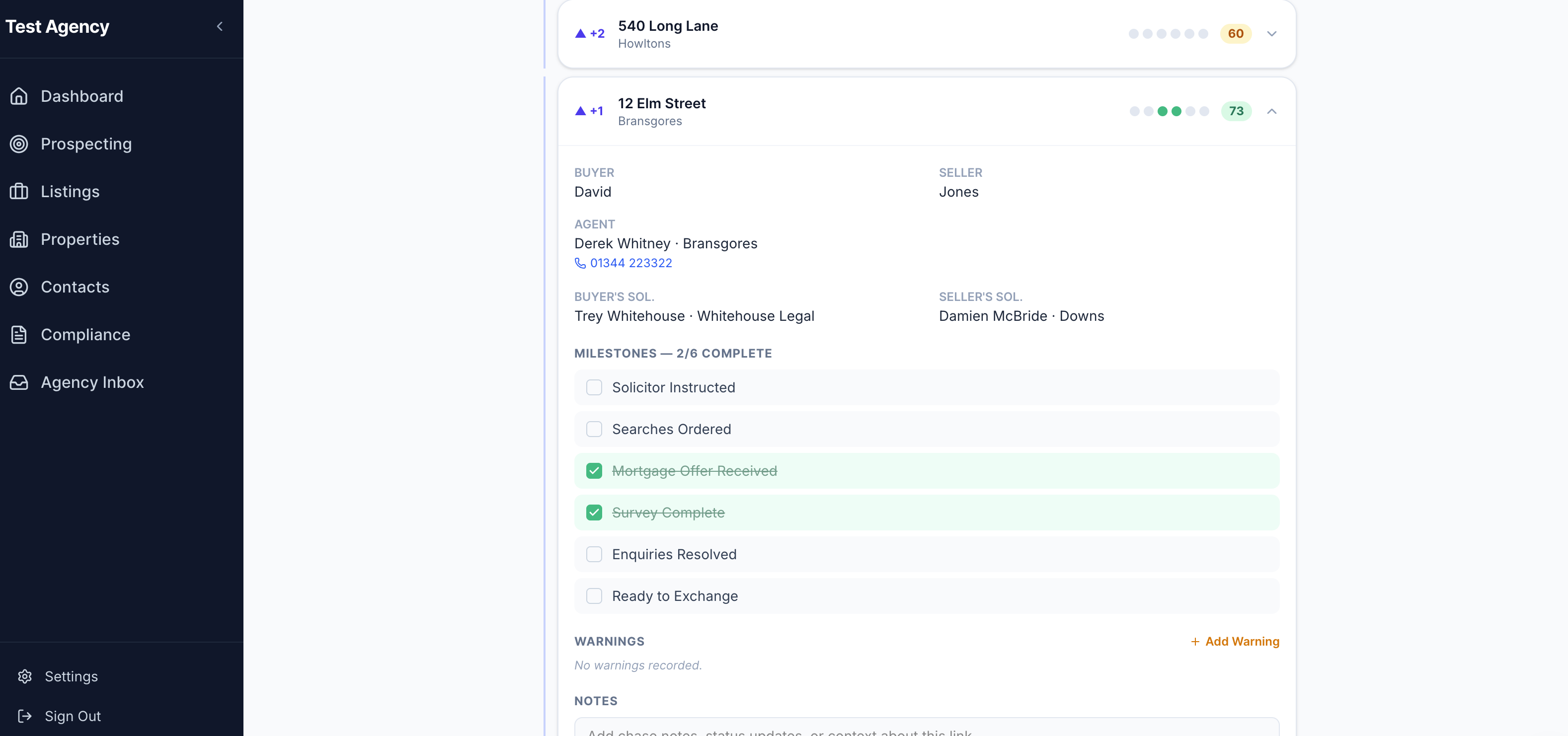
For each link in the chain you can see the buyer, seller, both solicitors, a milestone tracker, a chain health score, a warnings section, and a notes field for chase context.
Understanding the chain health score
Each link — and the overall chain — gets a health score out of 100, updated in real time as milestones are completed.
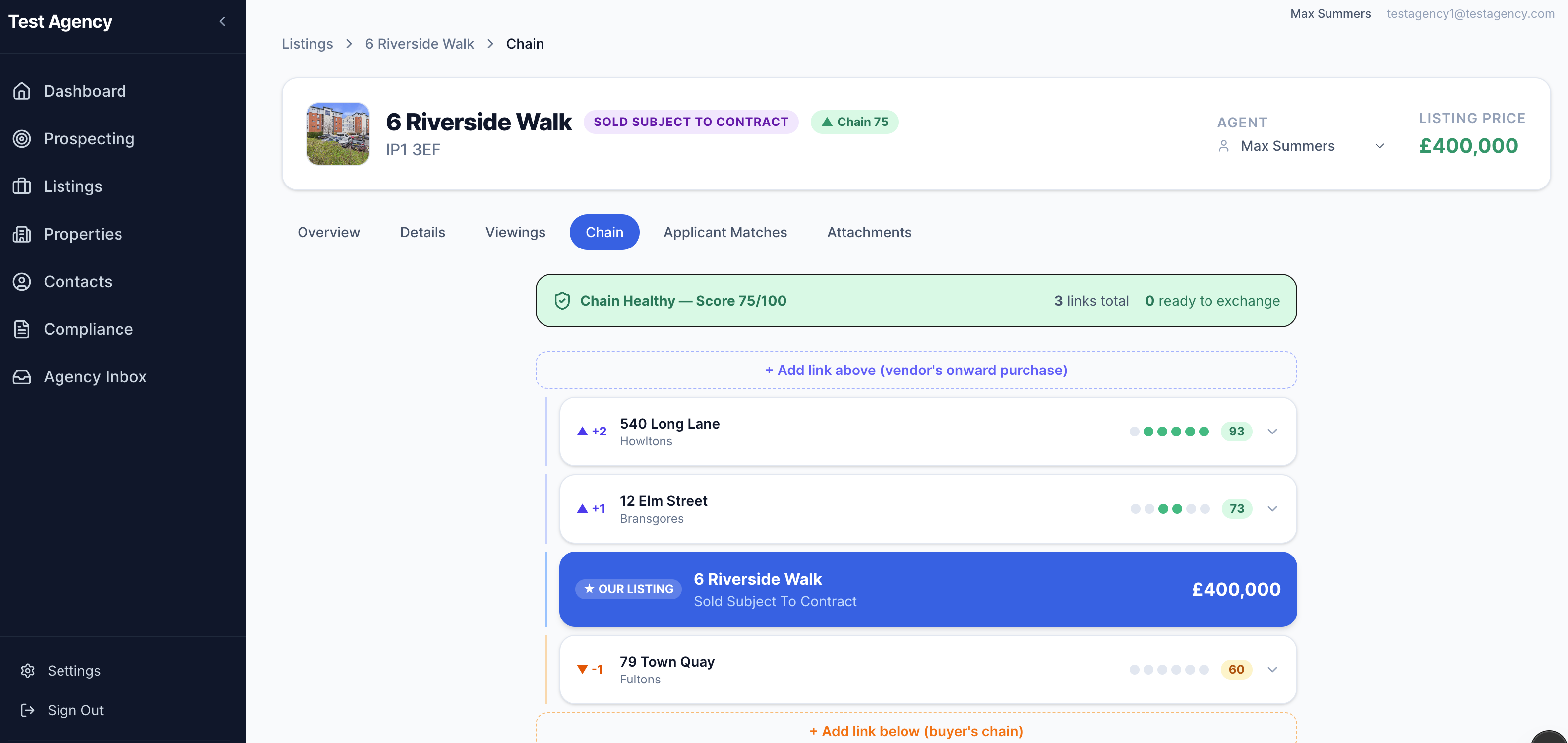
In this example, 79 Town Quay at the bottom of the chain is the weak link. Without XchangeHero, you'd find out when your solicitor calls to say the deal is at risk — probably weeks later. With XchangeHero, you can call the agent at Fultons today and take action before a 60 becomes a 40.
Y-branching — when a chain splits
Sometimes a single position in the chain involves more than one property. The most common scenario is two people buying together, each selling their own home. Both sales need to complete before the joint purchase can proceed — but they sit at the same level in the chain.
XchangeHero handles this with Y-branches. Click the Branch button (the fork icon) next to any existing link to add a parallel property at the same position. The two cards appear side by side, each with their own milestones, health score, and notes — so you can track both sales independently without losing sight of how they connect to the rest of the chain.
When to use a Y-branch
Use a Y-branch whenever a single step in the chain depends on more than one property completing. Common examples: two co-buyers each selling their own property; a vendor selling a buy-to-let and a main residence simultaneously to fund their purchase.
The overall chain health score accounts for Y-branches correctly — both cards contribute to the score at that level, but the chain length penalty is not doubled simply because the position splits.
Building your chain
Add chain links above (vendor's onward purchase) or below (buyer's chain) at any time using the + Add link buttons. Use the Branch button on any existing link to add a parallel Y-branch at the same level. The chain view updates in real time as milestones are completed across all links — even those managed by other agents.
The Chain Portal — keeping solicitors and buyers informed
From any chain link card, you can invite the people directly involved in that property — the buyer's solicitor, seller's solicitor, buyer, seller, or another agent — to a secure, read-only portal view of that link.
Each invited party receives a magic-link email. When they click it, they can see the milestone tracker for their specific property, leave notes, flag warnings, and — if they are a solicitor — tick milestones directly. No account creation required.
Inviting from the chain card
Expand any chain link card and scroll to the Portal Access section. For each role (Buyer's Solicitor, Seller's Solicitor, Buyer, Seller, Other Agent) you'll see one of three states:
- →Invite — no invite sent yet; click to send a magic link to the email on record
- ✓Sent — invite sent but not yet accepted; resend if it's gone quiet
- ✓Portal user — the party has set their password and is actively using the portal
What portal users can do
Solicitors
Tick milestones, add and resolve warnings, leave notes visible to all parties on that link.
Buyers & sellers
View milestone progress and chain health score, leave notes, flag warnings.
Other agents
Same as buyers and sellers — view and comment, but cannot tick milestones.
All parties
See notes from the estate agent and other portal users on their link. No cross-link data is ever visible.
Privacy
Portal users see only the data for their specific property link — not other properties in the chain, not other agencies' deals, and not the names or details of other parties beyond what is directly relevant to their transaction.
Cross-agency milestone sync
In any chain there can be multiple estate agencies each building their own view of the same transaction. This means a solicitor might receive portal invites from two different agencies for what is actually the same property — and face having to tick the same milestones twice.
XchangeHero solves this automatically. When a milestone is marked complete on any chain link, the system looks for matching chain links across all agencies and propagates the completion to them — so each solicitor only needs to update once.
How matching works
Two chain links are treated as the same property when both of these conditions are true:
- Same address — matched after normalisation (punctuation stripped, common abbreviations resolved: Road → Rd, Street → St, Avenue → Ave, etc.)
- At least one shared email — buyer solicitor, seller solicitor, buyer, seller, or other agent email must match on both links
The email requirement prevents false matches on common addresses — two different properties at “1 High Street” in different towns that happen to share no participants will never be merged.
Sync rules
- Completions propagate; un-ticking never does. Once a milestone is marked complete on any matching link, it will be marked complete on all of them. The sync engine never reverses a completion.
- Human un-ticks are sticky.If a solicitor on Agency B's portal explicitly un-ticks a milestone that was auto-synced, XchangeHero locks that milestone on their chain — the sync will not re-apply it. This respects local knowledge: the solicitor may have better information than the originating chain.
- New links inherit existing completions. When a new chain link is created or email/address details are updated to now match an existing link, the system immediately pulls in any already-completed milestones from matching chains.
What syncs — and what never does
Synced across agencies
- ✓ Milestone completion status
- ✓ Completion timestamp
Never crosses agency boundaries
- ✗ Buyer / seller names
- ✗ Notes or warnings
- ✗ Agent details
- ✗ Any other personal data
The sync indicator
Milestones that were completed by the sync engine are marked with a Synced badge — both in the agent chain view and in the portal milestone list. A blue dot (instead of the usual green) on the collapsed chain card also signals a synced completion at a glance.
No action needed
Cross-chain sync is fully automatic. There is nothing to configure — XchangeHero handles the matching and propagation in the background the moment a milestone is ticked.
Summary — what this means for your agency
Always know where you stand
Every deal, every milestone, every stage — visible at a glance. No more guessing.
Confident vendor updates
Tell your vendor exactly what's happening and what's needed — not "I'll find out."
Compliance handled automatically
AML checks, proof of funds, solicitor assignment — all triggered and tracked at the right moment.
Protect yourself if things go wrong
Every action timestamped, every nudge logged. If anything is ever disputed, it's on the record.
See the whole chain
Not just your listing — every link above and below, with health scores and milestone detail.
Act before deals fall over
Spot weak links early. Take action while there's still time to fix them.
Keep solicitors in the loop
Invite buyers, sellers, and solicitors to a secure portal with one click — no account setup needed.
One update, every chain
When the same property appears in multiple agency chains, a single milestone tick propagates to all of them automatically.
What to read next
- How the AI Inbox Agent works
How XchangeHero reads your emails and updates deals automatically
- Memorandum of Sale — full reference
Template fields, recipient logic, resend behaviour, and the MoS viewer
- AML compliance explained
What checks are required, when they're triggered, and where they're stored
- Getting started with your first listing
Add a property and move it through the pipeline step by step
More guides are on the way — check the sidebar as we publish them.